
The phone rings at 10:15am. It's someone who saw your listing for the two-bed on High Street. They want to book a viewing. You're already on another call, so it goes to voicemail. By the time you call back at 11:30am, they've already booked viewings with two other agents.
This happens constantly. Scheduling viewings by phone is inefficient for everyone - you're playing phone tag, applicants are frustrated, and meanwhile your competitors with slick online booking systems are capturing the leads.
The solution? Third-party booking tools like Appointlet or Calendly. But they come with their own problems:
- Monthly fees that add up across your portfolio
- Another login and another system to manage
- No integration with your property data (so you're copy-pasting between systems)
- Generic experience that doesn't feel like your agency
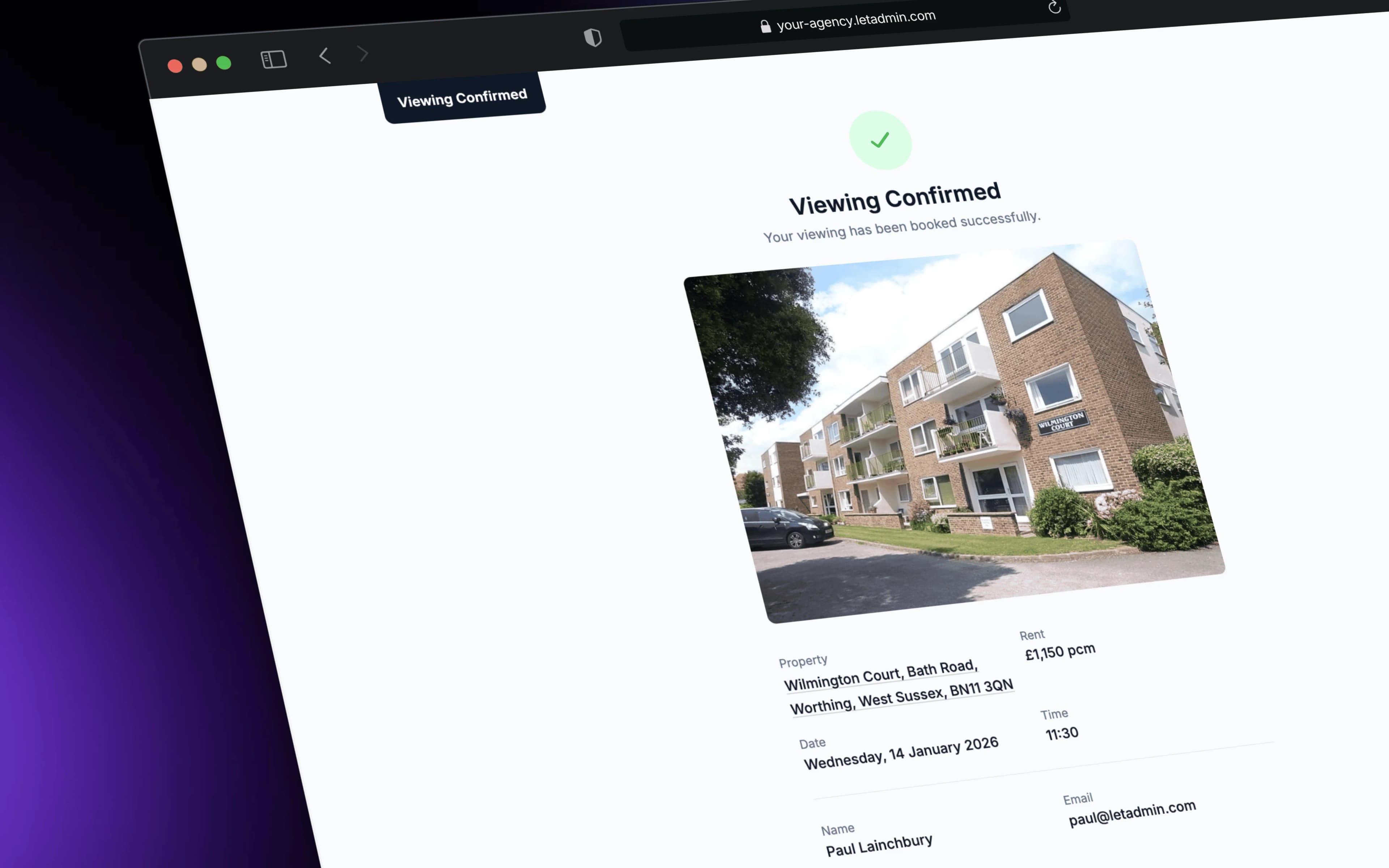
This week, we built viewing bookings directly into LetAdmin. Applicants can self-book viewings for your properties. Confirmation emails go out automatically. Everything stays in one system. And it's included - no extra monthly fee.
How It Works for Applicants
Every property in LetAdmin now has a viewing booking link. Share this link on your website, in responses to enquiries, or in any communication with prospective tenants.
When an applicant clicks the link, they see:
Your Availability
The booking page shows available time slots based on your agency's settings. Maybe you do viewings on weekday afternoons and Saturday mornings. Maybe certain properties have different hours because of occupier restrictions. The system knows.
Applicants see a clean calendar interface - no clutter, just the times that work for you.
Simple Booking Form
Once they pick a slot, they enter their details:
- Name and contact information
- Move-in date
- Number of tenants
- Employment status
- Any questions or requirements
This is the same information you'd ask on the phone, but they can complete it at 10pm when they're browsing listings - not during your office hours.
Instant Confirmation
After booking, applicants receive a confirmation email immediately. It includes:
- Date, time, and property address
- Your agency's contact details
- Any instructions you've configured (parking, access notes, etc.)
No waiting for you to "confirm the booking" - it's done automatically.
How It Works for Your Agency
Set Your Default Availability
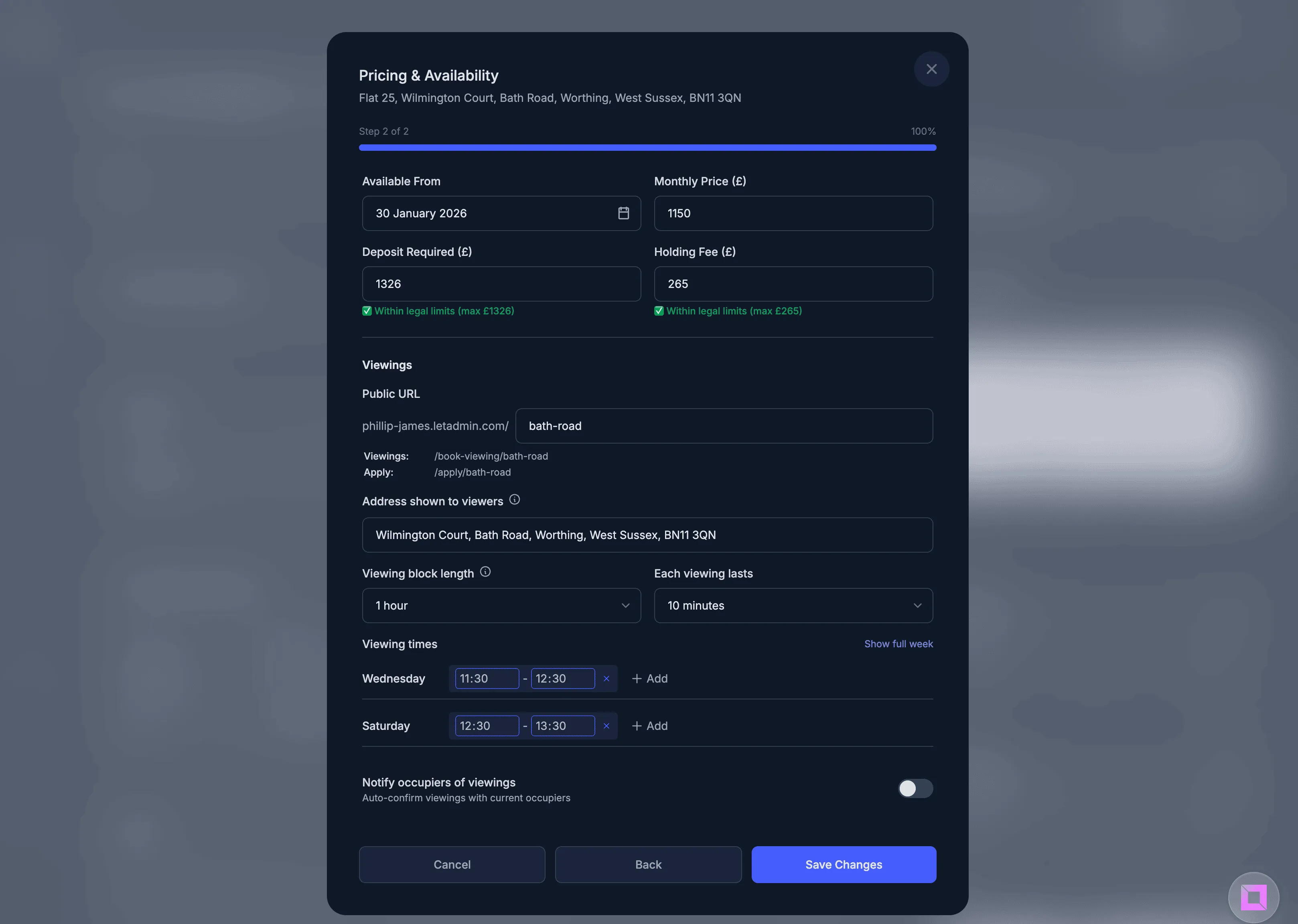
In Agency Settings, configure your standard viewing hours:
- Days of the week - Tick which days you offer viewings
- Time ranges - Morning, afternoon, or specific hours
- Slot duration - 15, 20, or 30 minute viewings
- Gap between viewings - Time for travel between properties
These defaults apply to all properties unless you override them.
Property-Level Overrides
Some properties need different settings:
- Occupied properties - Current tenant only available on Saturdays
- Properties with parking issues - Need longer slots for explanation
- New instructions - Block viewings until keys are collected
Set per-property overrides that take precedence over your agency defaults.
Viewing Blocks
Sometimes you know viewings for a property will happen in a specific window - the week after marketing starts, or the three days before a tenant moves out. Create viewing blocks that concentrate availability into specific date ranges.
Pre-qualification Questions
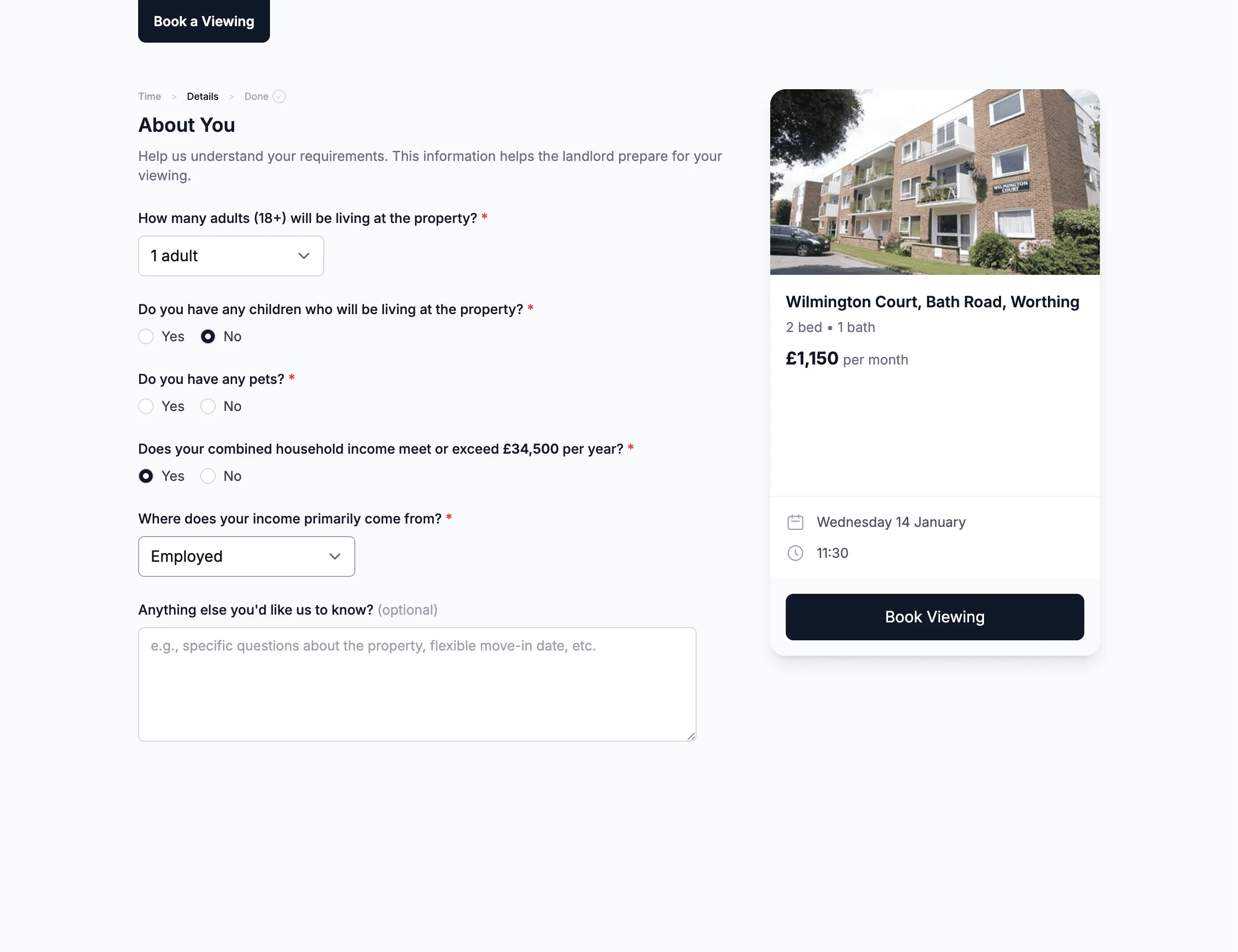
Want to filter out unsuitable applicants before they book? Enable pre-qualification questions:
- Employment status (to check affordability)
- Pets (if property is no pets)
- Smoker status
- Number of occupants (to check against property capacity)
Applicants answer before booking, so you have the information upfront.
Real-World Example: A Week of Viewings
Before built-in bookings (typical agency workflow):
Monday: Three viewing enquiries by phone, two go to voicemail Tuesday: Call back voicemail enquiries, one doesn't answer Wednesday: Finally book viewing with voicemail person, they've also booked with competitor Thursday: Viewing at 2pm, applicant doesn't show (double-booked themselves) Friday: Phone rings constantly, can't get other work done
Time spent on viewing admin: 3-4 hours Viewings completed: 4 No-shows: 2
With LetAdmin's viewing bookings:
Applicants book themselves throughout the week Confirmation emails go automatically You see your viewing schedule each morning Reminder emails reduce no-shows You spend your time on viewings, not scheduling them
Time spent on viewing admin: 30 minutes Viewings completed: 8 No-shows: 0
The difference is dramatic. Self-service booking means applicants can schedule at their convenience (evenings, weekends, whenever they're browsing). Automatic confirmations and reminders reduce the back-and-forth. And because everything's integrated, you're not copy-pasting between systems.
What About Existing External Links?
If you're already using Appointlet, Calendly, or another booking tool, we haven't removed that functionality. The external viewing link field still exists - you can use either approach or migrate gradually.
But long-term, having bookings inside LetAdmin means:
- One fewer subscription to manage
- No copy-pasting property details between systems
- Viewing data in context - see all enquiries, viewings, and applications for a property in one place
- Branded experience - emails come from your agency, not a third-party tool
What's Included
The viewing booking system is included in LetAdmin - no extra per-property or per-booking charges. Whether you have 30 properties or 300, the cost is the same.
Compare that to:
- Appointlet Pro: From $8/month per user
- Calendly Teams: From $12/month per user
- Various property-specific tools: Often £20-50/month
For a small team of 3-4 people, that's potentially £50-200/month in booking tool subscriptions - savings that go straight to your bottom line.
What's Included
The viewing system comes with everything you need out of the box:
Calendar sync - Viewings automatically appear in your calendar with all the details you need
SMS reminders - Text message reminders before viewings to reduce no-shows
Viewer self-reschedule - Applicants can reschedule themselves without phone calls - just a link in their confirmation email
Occupier notifications - Current tenants are automatically notified about upcoming viewings, with reminders before each viewing block
We'd Love to Hear from You
How do you currently handle viewing bookings? Phone and email? Appointlet? Something else?
What's the most frustrating part of scheduling viewings? The phone tag? The no-shows? The admin time?
We're building LetAdmin to eliminate the friction in letting agency work, and your feedback directly shapes our priorities. Drop us a message - we'd love to hear how viewing management could be better for your agency.
LetAdmin is in active development, designed for independent letting agents who want to run more efficiently without enterprise software prices. If you're paying for multiple external tools that should really be part of your core system, we should talk.