
It's 9:47pm on a Tuesday. Someone browsing Rightmove sees your two-bed flat on Church Street. They like it. They hit "Request Details" and fill in their information: name, email, phone, move-in date, employment status.
Within seconds, they receive an email and SMS from your agency. Property details, photos, rent, and a link to book a viewing - all automatically. They click the link, pick a slot that works for them, and book the viewing. Done.
You didn't do anything. You were at home watching TV. But your agency just converted an enquiry to a viewing in under five minutes - at 9:47pm on a Tuesday.
This is the Enquiry Journey in LetAdmin. Fully automated, from portal enquiry to viewing booked.
The Old Way: Manual and Slow
Here's how most agencies handle Rightmove enquiries:
- Rightmove sends email notification to your inbox
- You see it when you check email (maybe tomorrow morning)
- You read the enquiry, open your property software
- You manually type a response with property details
- You include your phone number and ask them to call
- They call during your lunch break, you miss it
- Phone tag continues for 2-3 days
- Eventually you agree a viewing time
- You manually add it to your calendar
Time from enquiry to viewing booked: 2-5 days Your time spent: 30-45 minutes per enquiry
Meanwhile, the faster agent down the road already booked the viewing and let the property.
The LetAdmin Way: Fully Automated
Here's the same enquiry in LetAdmin:
- Rightmove enquiry arrives
- LetAdmin receives it in real time
- Within seconds: email and SMS sent automatically with property details and viewing booking link
- Prospect clicks link, books viewing themselves
- Confirmation sent, viewing in your calendar
Time from enquiry to viewing booked: 5 minutes Your time spent: Zero
The entire flow happens automatically. You see the viewing in your schedule the next morning, already confirmed.
How It Works: The Complete Flow
Step 1: Enquiry Received in Real Time
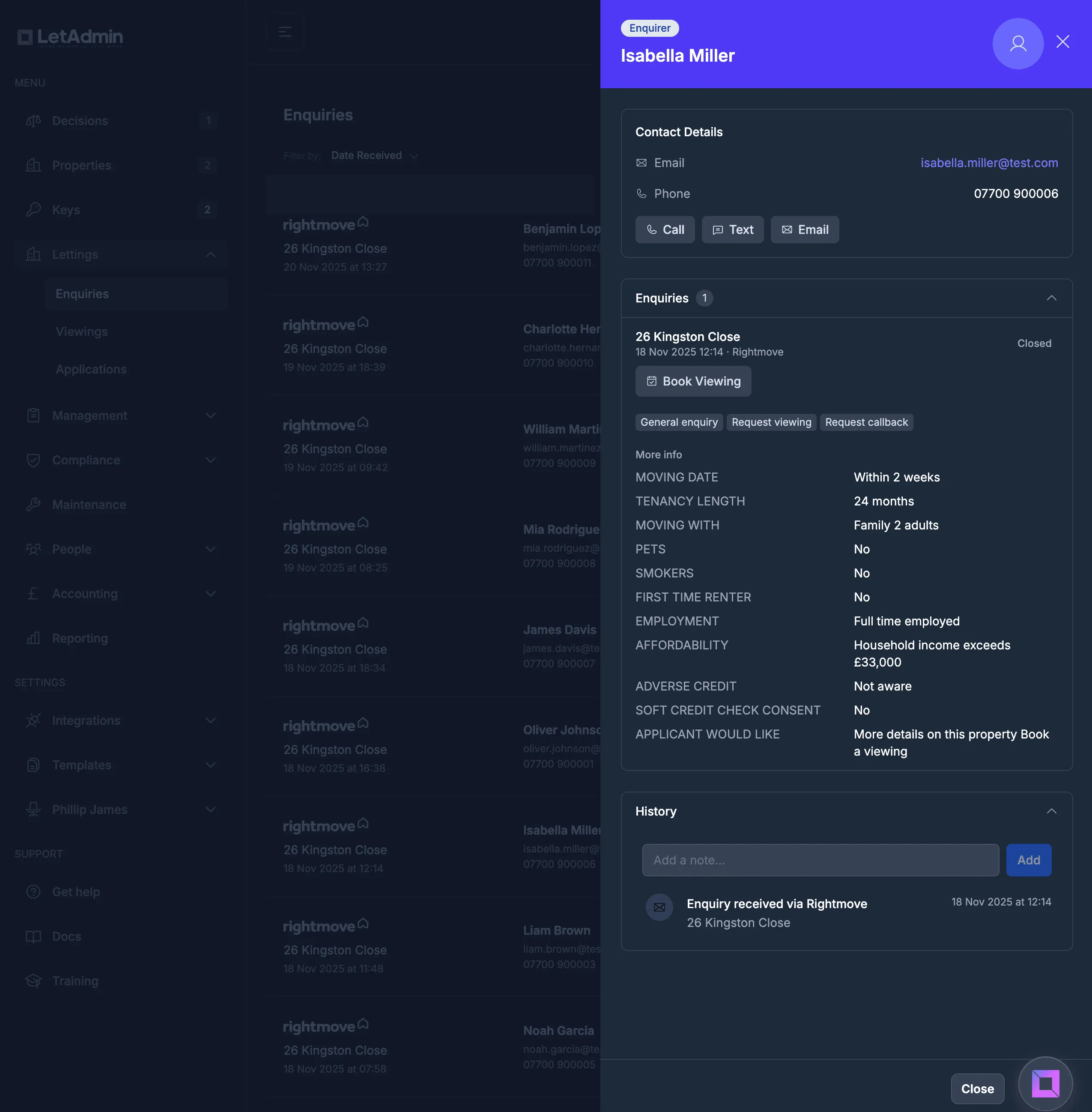
When someone enquires on Rightmove, LetAdmin receives it immediately. Not as an email you have to check - it arrives in the system in real time.
The system extracts everything Rightmove provides:
- Prospect's name, email, and phone number
- Preferred move-in date
- Number of tenants
- Employment status
- Whether they have pets
- Affordability confirmation
All this data is captured automatically and attached to the enquiry record.
Step 2: Instant Auto-Response
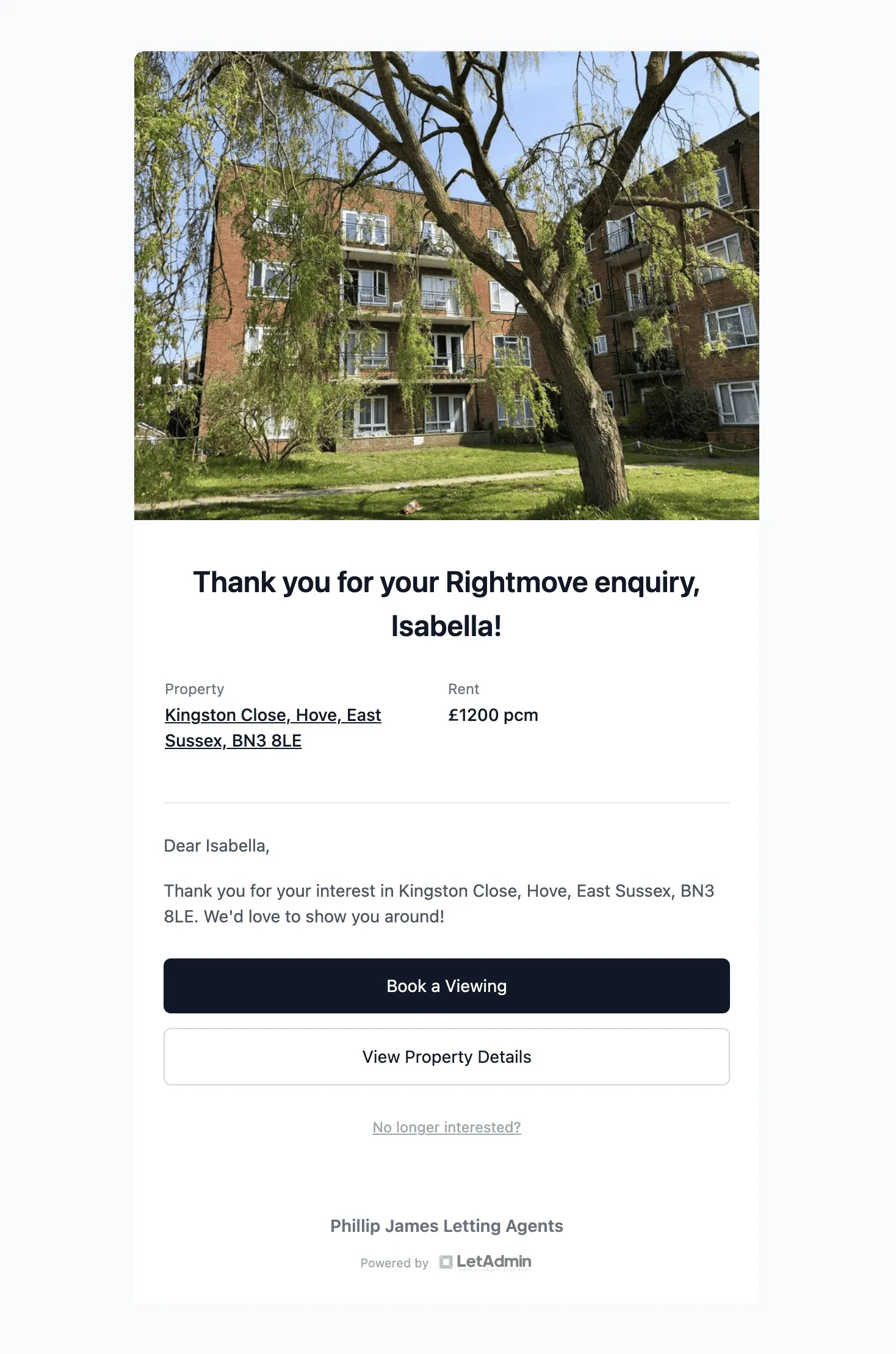
Within seconds of the enquiry arriving, LetAdmin sends your response:
Email - A professionally branded email including:
- Thank you message
- Property details (address, rent, deposit)
- Property photos
- Direct link to book a viewing
- Your agency contact details
SMS - A text message with:
- Quick acknowledgment
- Link to book a viewing
The prospect gets both immediately. No waiting for you to see the email, no delay while you type a response. Instant.
Step 3: Prospect Books Viewing (Self-Service)
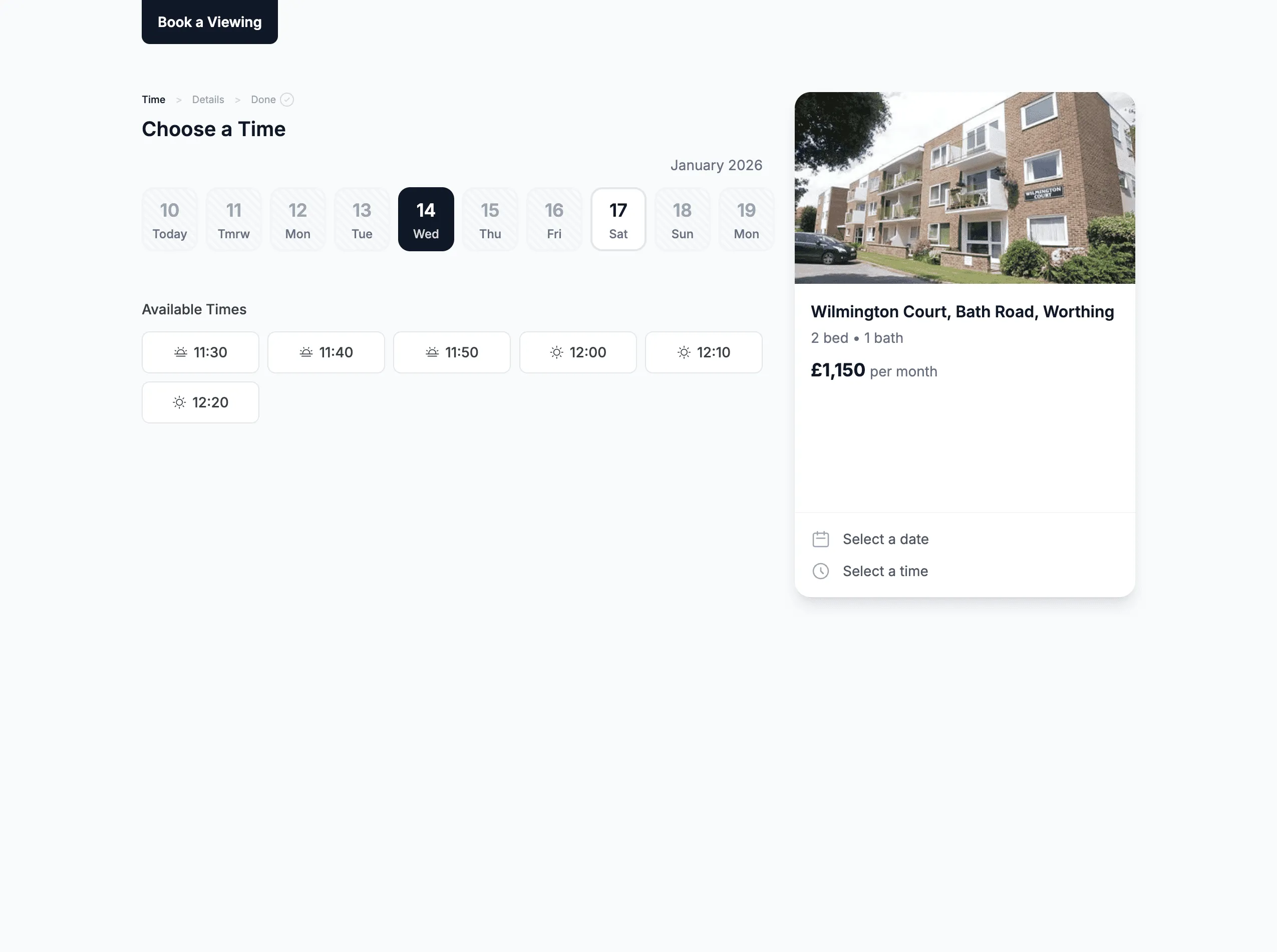
The email and SMS include a direct link to your viewing booking page. The prospect clicks it and sees:
- Available viewing slots based on your configured availability
- Property details and photos
- Simple booking form
They pick a slot, confirm their details, and book. The viewing is created automatically, confirmation emails go out, and it appears in your calendar.
The prospect went from "interested" to "viewing booked" without you doing anything.
Step 4: Automatic Follow-Up (If Needed)
What if the prospect doesn't book immediately? Maybe they were browsing before bed and fell asleep. Maybe they got distracted.
LetAdmin follows up automatically:
Day 1 - Follow-up email and SMS: "Still interested in Church Street? Book a viewing here..."
Day 2 - Another nudge: "The property is still available - don't miss out..."
Day 7 - Final follow-up: "Last chance - is this property still on your radar?"
Each message includes the viewing booking link. The moment they book a viewing, the follow-ups stop automatically.
Step 5: Journey Completes
The journey ends when:
- Viewing booked - Success! They clicked the link and booked.
- Prospect unsubscribes - They clicked "not interested" in the email.
- Property unavailable - You marked it as let or withdrawn.
- All follow-ups sent - They didn't respond after all attempts.
Every outcome is tracked. You can see exactly what happened with every enquiry.
Real Example: Phillip James Lettings
Phillip James manages hundreds of properties. Here's what their enquiry flow looks like:
Before LetAdmin:
- Staff manually responding to enquiries during office hours
- Evening and weekend enquiries waiting until Monday morning
- Phone tag to arrange viewing times
- Lost leads to faster competitors
With LetAdmin's Enquiry Journey:
- Enquiries responded to in seconds, 24/7
- Viewing booking links in every response
- Automatic follow-up sequence
- Viewings booked while the office is closed
The result: More viewings booked, faster response times, and staff freed up from repetitive email work.
Fully Configurable
Every agency is different. The Enquiry Journey is fully configurable:
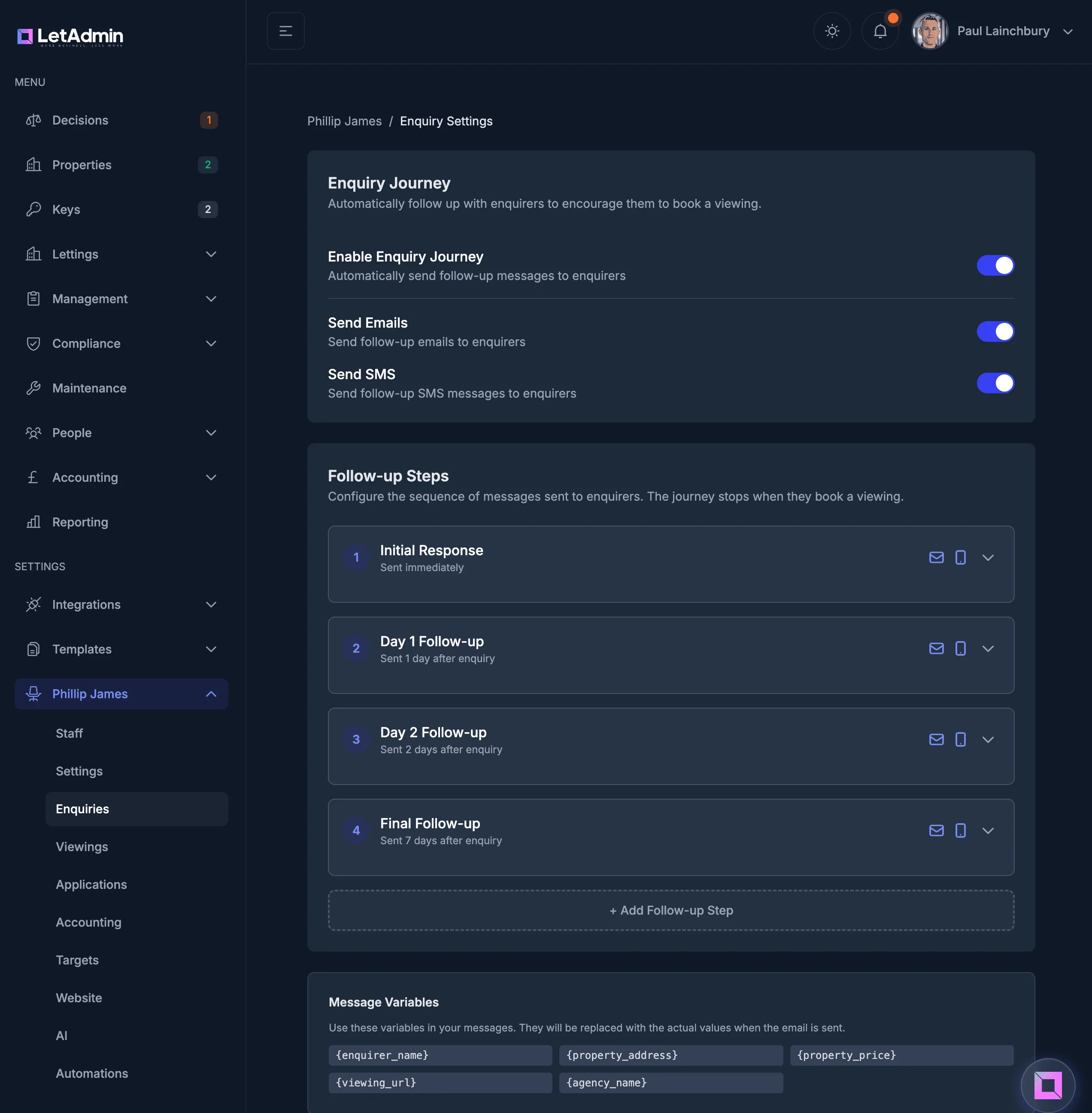
Message Content
Customise every message:
- Email subject lines
- Email body text
- SMS content
- Property details to include
Use variables that populate automatically: {prospect_name}, {property_address}, {rent}, {viewing_url}, {agency_name}.
Timing
Configure when follow-ups send:
- Immediate response (always)
- Day 1, Day 2, Day 7 (default)
- Or any schedule that works for your agency
Add more steps, remove steps, adjust timing - it's your journey.
Channels
Toggle email and SMS independently:
- Both channels for maximum reach
- Email only if you prefer
- Different channels for different follow-up steps
Per-Step Control
Each follow-up step can have different settings:
- Enable/disable email for this step
- Enable/disable SMS for this step
- Different message content for each step
What You See in LetAdmin
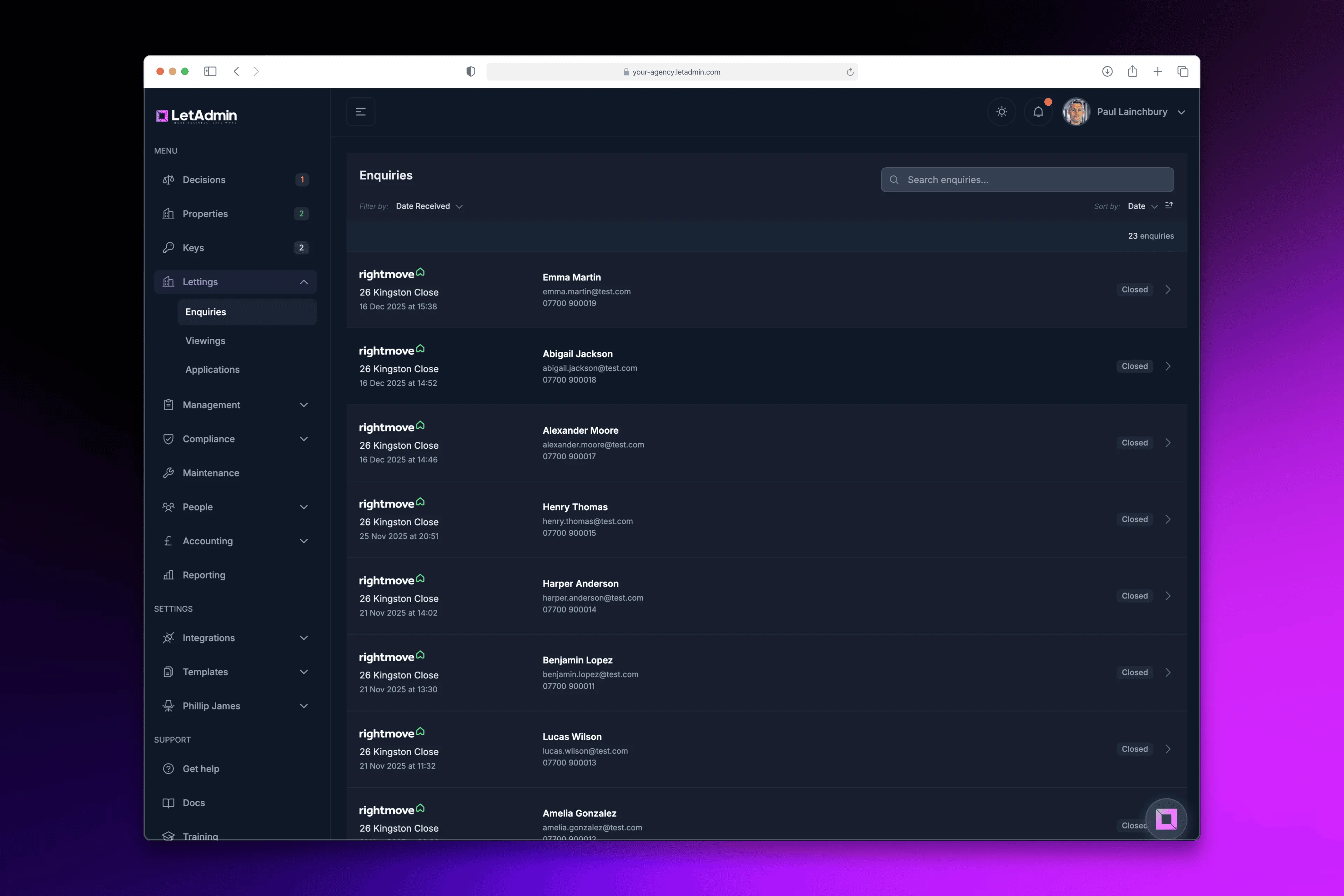
The Enquiries page shows every enquiry with:
- Prospect name and contact details
- Property they enquired about
- Current status (active, viewing booked, no response, etc.)
- Journey progress (which follow-ups have been sent)
- Full timeline of all communications
Click any enquiry to see:
- All extracted Rightmove data (move-in date, pets, employment)
- Every email and SMS sent (with timestamps)
- Viewing details if booked
- Complete audit trail
Real-time updates mean you see new enquiries appear instantly. No refreshing, no checking email.
The Numbers
For a typical agency receiving 50 Rightmove enquiries per month:
Without automation:
- Response time: 2-24 hours (depending on when staff check email)
- Manual time per enquiry: 30-45 minutes
- Total monthly time: 25-37 hours
- Viewing conversion: ~30% (many lost to slow response)
With LetAdmin's Enquiry Journey:
- Response time: Seconds
- Manual time per enquiry: Zero
- Total monthly time: Zero
- Viewing conversion: 50-60% (faster response = more bookings)
That's potentially 25+ hours per month saved, plus more viewings booked from the same number of enquiries.
Why Speed Matters
Research consistently shows that the first agent to respond wins the lead. Prospects enquire on multiple properties simultaneously. The agent who responds in 5 minutes books the viewing. The agent who responds in 5 hours gets "sorry, I've already arranged viewings."
When your response goes out in seconds - at 9:47pm, at 6am on Sunday, during your lunch break - you're always the first responder.
We'd Love to Hear from You
How do you currently handle Rightmove enquiries? Manual responses? How long does it typically take?
How many enquiries do you think you lose to slow response times?
What would fully automated enquiry-to-viewing mean for your agency?
We built this because we saw how much time agencies waste on repetitive enquiry responses. Drop us a message - we'd love to show you how it works.
LetAdmin is in active development, built by letting agents for letting agents. The Enquiry Journey is being used at Phillip James (370+ properties) and refined based on real-world usage. If you're tired of manual enquiry responses, we should talk.