
The viewing went well. The couple loved the flat, they're keen to apply. Now you need to get them through your application process.
For most agencies, this means switching to a separate system - a third-party pre-tenancy tool that handles applications, another for referencing, maybe another for document collection. Different logins, different interfaces, data that doesn't sync properly. You're paying multiple subscriptions for tools that don't talk to each other.
Then there's the applicant experience: they receive links to different portals at different stages, create multiple accounts, and wonder why a letting agency needs so many separate systems.
We've built applications directly into LetAdmin. One system, one login, one place where everything connects.
Digital Application Forms
Every property in LetAdmin has a public application link. Share it after a viewing, and applicants complete their application directly in their browser.
Step-by-Step Process
The application form guides applicants through each section:
Step 1: Personal Details
- Full name and date of birth
- Contact details (validated phone and email)
- Employment status and income
- Adverse credit disclosure
- Right to Rent status
Step 2: Household
- Add joint applicants (unlimited)
- Relationship between applicants
- Number of children
- Pet information
Step 3: Timing & Preferences
- Preferred move-in date
- Guarantor availability
- Message to landlord
Step 4: Declaration
- Terms and conditions acceptance
- Submit application
Each step validates before allowing the applicant to continue. Invalid email addresses, incomplete fields, and missing required information are caught before submission.
What You Receive
When an application is submitted:
- Decision task created - The application appears in your decision queue for review
- Real-time update - Your Applications list updates instantly (no refresh needed)
- Structured data - Every field is clean, validated, and searchable
- Complete picture - Income, employment, Right to Rent status, household composition
No more deciphering handwriting. No more chasing for missing information. Applications arrive complete.
Fully Configurable
Every agency works differently. The application process in LetAdmin adapts to how you want to operate.
Form Content
Customise what applicants see:
- Welcome text - Your introduction with property-specific placeholders
- Terms and conditions - Your legal text, captured at submission
- Post-submission message - What happens next, in your words
- Holding fee instructions - Bank details, payment reference format
All text fields support formatting, so you can create professional, branded communications.
Form Behaviour
Control how the form works:
- Nationality field - Toggle on or off based on your needs
- Guarantor question - Always ask, or only when income is insufficient
- Income multiplier - Set your affordability threshold (default 2.5x annual rent)
- Guarantor income multiplier - Set guarantor requirements (default 3.0x annual rent)
These settings apply across your portfolio, ensuring consistent processes.
Joint Tenancies Made Simple
Joint tenancies have always been administratively complex. Multiple people, multiple sets of documents, multiple reference checks - all needing to be tracked and completed.
How It Works
The lead applicant completes the initial application, adding joint applicants with their basic details. When you invite them to proceed:
- Each applicant gets their own portal access - Separate login, separate progress
- Each completes their own checks - ID verification, address proof, Right to Rent
- Each uploads their own documents - No sharing accounts or forwarding links
- Progress tracked individually - See exactly who's completed what
The application only moves forward when all applicants have completed their required steps. No more chasing one person while waiting on another.
Relationship Context
For joint applications, the system captures the relationship between applicants - partners, family members, friends. This context helps when reviewing applications and understanding household dynamics.
The Applicant Portal
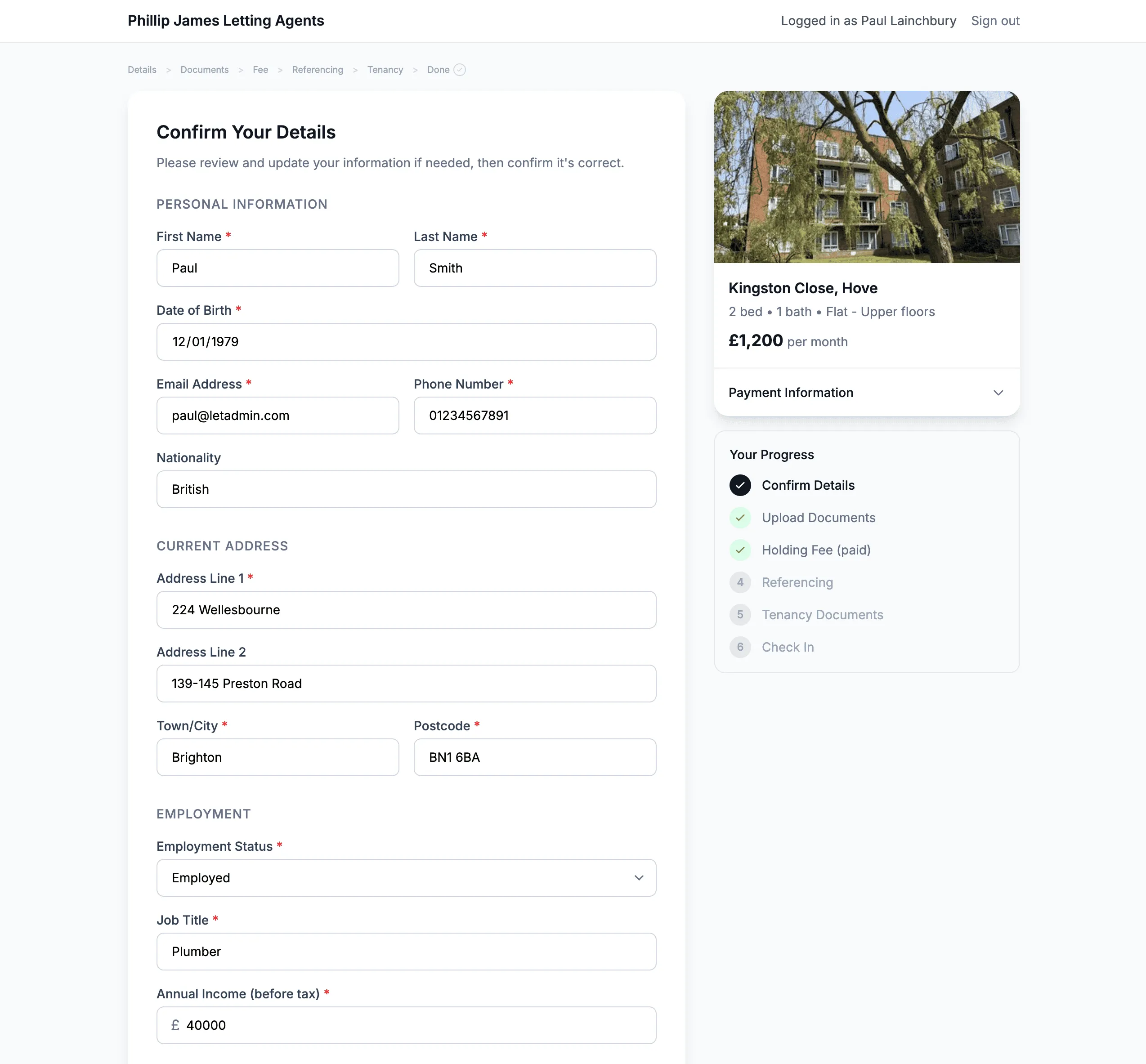
Once you invite applicants to proceed, they access their portal to complete the pre-tenancy process.
What Applicants Do in the Portal
Confirm Details - Review and update the information from their application
Upload Documents - ID verification, proof of address, Right to Rent documents
Holding Fee - See payment details, indicate when they've paid
Track Progress - Visual progress tracker showing completed and pending steps
Everything in one place. Applicants don't need to switch between systems or wonder what's happening next.
Automated Chase Reminders
What happens when applicants don't complete their steps promptly?
LetAdmin sends automatic reminders:
- Daily chase emails to applicants with incomplete tasks
- SMS reminders (if you have SMS enabled) for faster response
- Clear next steps in every reminder
Chase reminders stop automatically when:
- All required steps are complete
- Holding fee is confirmed
- Application is cancelled or rejected
No manual chasing required. The system follows up so you don't have to.
What You See in Applications
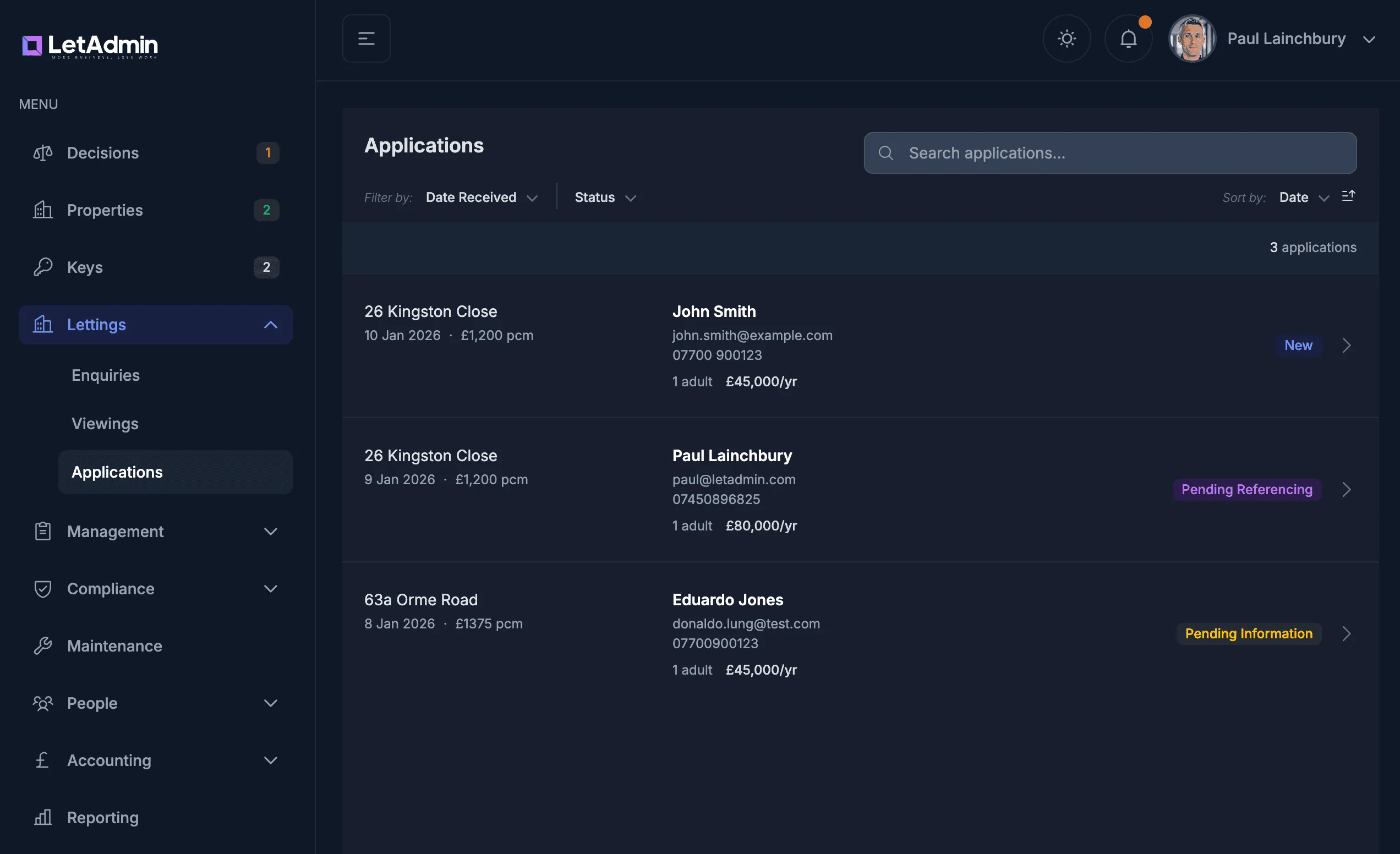
The Applications page in LetAdmin shows:
Application List
- All applications, sorted by recency
- Property name and address
- All applicant names
- Current status (New, Pending Information, Pending Referencing, etc.)
- Quick filters by property, status, date
Application Detail
- Full applicant information for each person
- Employment and income details
- Document upload status
- Holding fee status
- Complete activity timeline
Actions
- Invite to proceed (triggers portal invitations)
- Confirm holding fee received
- Approve or reject at each stage
- Add internal notes
Everything's connected. Application data flows into the portal, which flows into referencing, which flows into tenancy creation.
The Complete Workflow
Applications in LetAdmin follow a clear pipeline:
1. New - Application submitted, appears in your decision queue
2. Pending Information - You've invited them to proceed, waiting for portal completion
3. Pending Referencing - Holding fee confirmed, referencing underway
4. Pending Agreement - Referencing approved, ready for tenancy agreement
5. Completed - Agreement signed, tenancy created
At each stage, you know exactly what's needed to move forward. No guesswork, no manual tracking.
Why This Matters
One system - Applications, documents, referencing, and tenancy creation in one place
Configurable - Adapt the process to how your agency works
Automated follow-up - Chase reminders without manual effort
Joint tenancy support - Each applicant tracked independently
Professional experience - Applicants see a modern, organised process
For agencies currently paying for separate pre-tenancy tools, application systems, and document collection platforms - this is all included in LetAdmin.
We'd Love to Hear from You
How many different systems do you currently use for the pre-tenancy process?
What's the most frustrating part of getting from application to tenancy?
How much time do you spend chasing applicants for documents?
We're building LetAdmin to be the single system you need. Drop us a message - we'd love to hear about your application workflow.
LetAdmin is in active development, designed for letting agents who want one system instead of many. If you're tired of switching between tools and paying multiple subscriptions, we should talk.