
It's 10:15am on a Tuesday. A landlord calls asking about their tenant at 42 Maple Street. When does the tenancy end? What was the last inspection result? Is the deposit registered? Has the rent been reviewed this year?
In most letting agency software, answering these questions means opening the property, then navigating to the tenancy tab, then clicking through to tenant details, then back to check the inspection history, then over to the documents section for the deposit certificate.
By the time you've found everything, the landlord's been on hold for two minutes and you've lost your train of thought from whatever you were doing before.
We thought there had to be a better way.
The Problem with Traditional Property Software
Traditional letting agent software is built around properties. Which makes sense - properties are the core of what you manage. But the reality of day-to-day agency work is that you're constantly switching context between properties, tenants, landlords, inspections, and compliance.
When a tenant phones about a repair, you need their contact details immediately. When a landlord asks about rent arrears, you need the payment history. When you're preparing for a checkout, you need the move-in inspection, the inventory, the deposit details, and the tenant's forwarding address.
All of this information exists in your system. But finding it quickly? That's where most software falls short.
Introducing the Tenancy Slideover
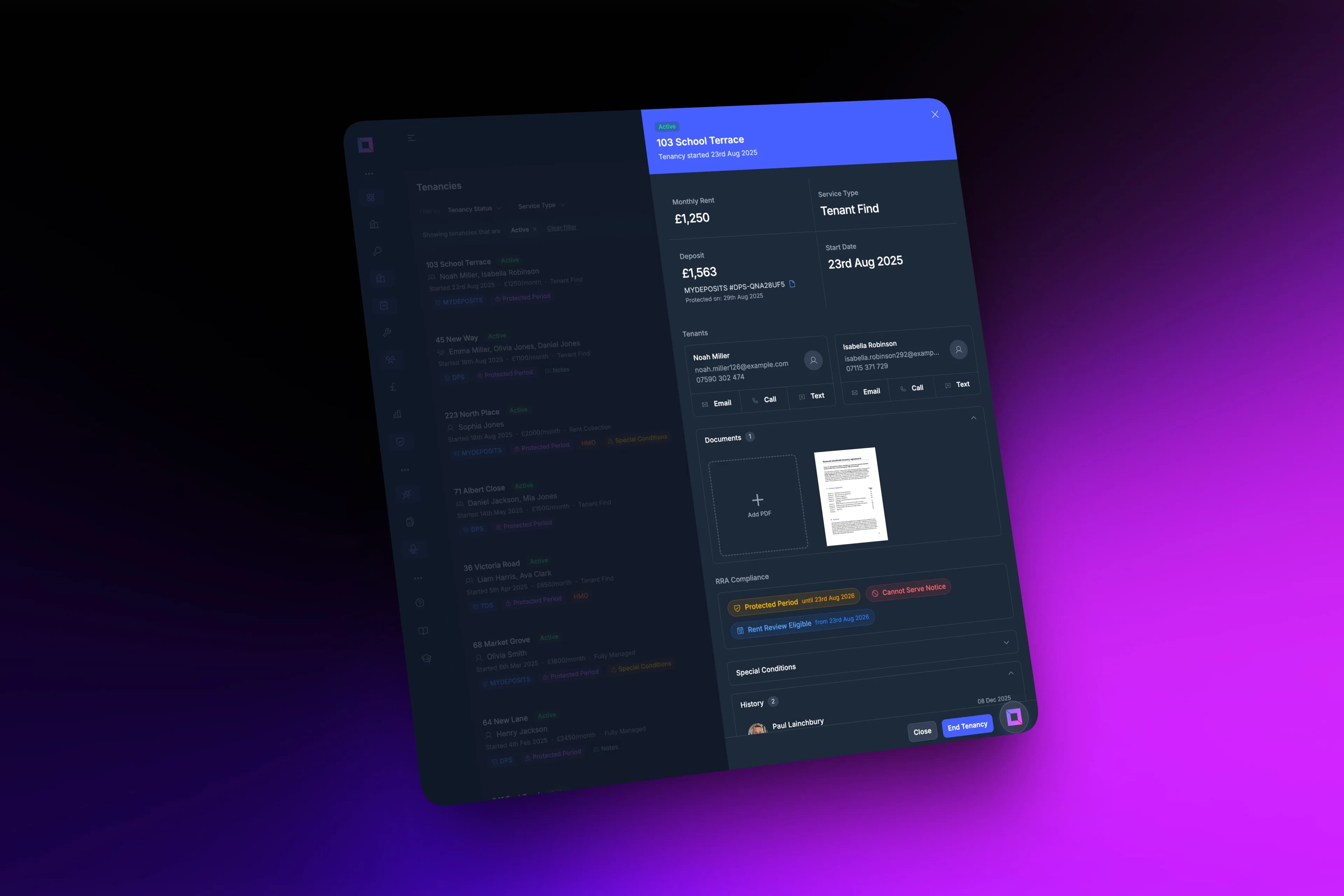
We've built something we're calling the tenancy slideover. It's a panel that slides in from the right side of your screen when you click on any tenancy in your list. No page loads, no navigation, no losing your place.
Within that single panel, you get:
Tenant Details at a Glance
The tenant's name, phone number, and email are right at the top. Click on a tenant's card and a nested panel opens with their full contact history, previous tenancies, and any enquiries they've made. You can even edit their contact details inline without navigating away.
Agreement Information
See the tenancy start date, current end date, and the type of agreement. If there have been renewals or variations, they're all listed chronologically so you can trace the tenancy's history.
Rent Review History
Every rent increase is logged with the effective date, old rent, new rent, and percentage change. When a landlord asks "what was the rent two years ago?", you have the answer in seconds.
Inspection Schedule
See all past and upcoming inspections for this tenancy. The most recent inspection result is highlighted so you can immediately spot if there were any issues flagged.
Deposit Protection
The deposit amount, protection scheme, registration number, and certificate are all visible. If the deposit isn't registered, you'll see a clear warning (more on this in our next article about deposit tracking).
Renters' Rights Act Compliance
For tenancies that fall under the new Renters' Rights Act requirements, there's a dedicated section showing compliance status. For company lets (which aren't covered by the RRA), this section is automatically hidden - no need to see irrelevant information.
It Updates in Real Time
Here's where it gets clever. The slideover isn't just a static snapshot - it's connected to your data in real time.
If a colleague updates the tenant's phone number while you have the slideover open, you'll see the change immediately. If an inspection is completed, it appears in the list. If a rent review is processed, the figures update.
This means you can have a phone conversation with a landlord, make updates as you talk, and see those changes reflected instantly without refreshing or re-opening anything.
Nested Information Without Navigation
One of the most frustrating things about property software is the constant back-and-forth navigation. You're looking at a tenancy, you need to check the tenant's other properties, so you click through to the tenant, then you need to get back to the tenancy, but you've lost your place...
The tenancy slideover solves this with nested panels. Click on a tenant's name and their details slide in on top. Click on a property reference and those details slide in. When you're done, click the backdrop or the close button and you're right back where you were.
It's like having multiple browser tabs, but they're all connected and you never lose context.
Designed for Real Agency Workflows
We built this by watching how letting agents actually work. Not how software manuals say they should work, but how they really do.
When the phone rings, you need information fast. The slideover opens instantly - no loading spinners, no page refreshes. The most important information (tenant contact details, rent amount, next key dates) is visible immediately without scrolling.
When you're working through a list of tenancies - perhaps doing rent review calls or preparing for renewals - you can click through tenancy after tenancy without ever leaving the list view. Open one, check the details, close it, open the next. It's dramatically faster than the traditional "click to view, click back to list, click to view the next one" pattern.
When you need to update something quickly, the edit buttons are right there. No hunting through menus or navigating to a separate edit screen.
Documents at Your Fingertips
We've also added a documents section to the tenancy slideover. You can see all attached documents - tenancy agreements, deposit certificates, correspondence - as thumbnail previews. Hover over any document to view or delete it. Drag and drop new files to upload them instantly.
This means when a tenant asks for a copy of their tenancy agreement, you can find it and email it while they're still on the phone. No digging through file systems or document management screens.
What This Means for Your Agency
The cumulative effect of these improvements is significant. We estimate that for a typical agency handling 150-200 managed properties, the tenancy slideover saves around 30-45 minutes per day in navigation time.
That might not sound like much, but it's 2-3 hours per week. Over a year, that's time you could spend on higher-value activities - winning new instructions, building landlord relationships, or simply leaving the office on time.
More importantly, it makes your team's experience better. Nobody enjoys clicking through endless screens looking for information. Software should help you work, not create busywork.
Run Your Agency from Anywhere
Check tenancy details while you're at a property. Call or text a tenant directly from their contact card. Review deposit protection status between viewings. The mobile experience isn't a cut-down version of the desktop - it's the same powerful system, optimised for touch.
This matters because agency work doesn't happen at a desk. When a landlord calls while you're out, you can pull up the tenancy instantly and answer their questions. When you're doing a property visit and need to check the agreement terms, everything is right there.
What's Next
The tenancy slideover is the first step in a broader redesign of how information flows through LetAdmin. We're applying the same thinking to properties, landlords, and inspections.
The goal is simple: whatever you need to know, you should be able to find it in one or two clicks. No hunting, no navigating, no frustration.
We'd love to hear how you currently handle tenant and tenancy information in your agency. What frustrates you most about your current software? What information do you find yourself searching for repeatedly? Drop us a message - your feedback directly shapes what we build next.